NEC4 Application for Payment Template
Written from experience on CTRL, Crossrail and Network Rail
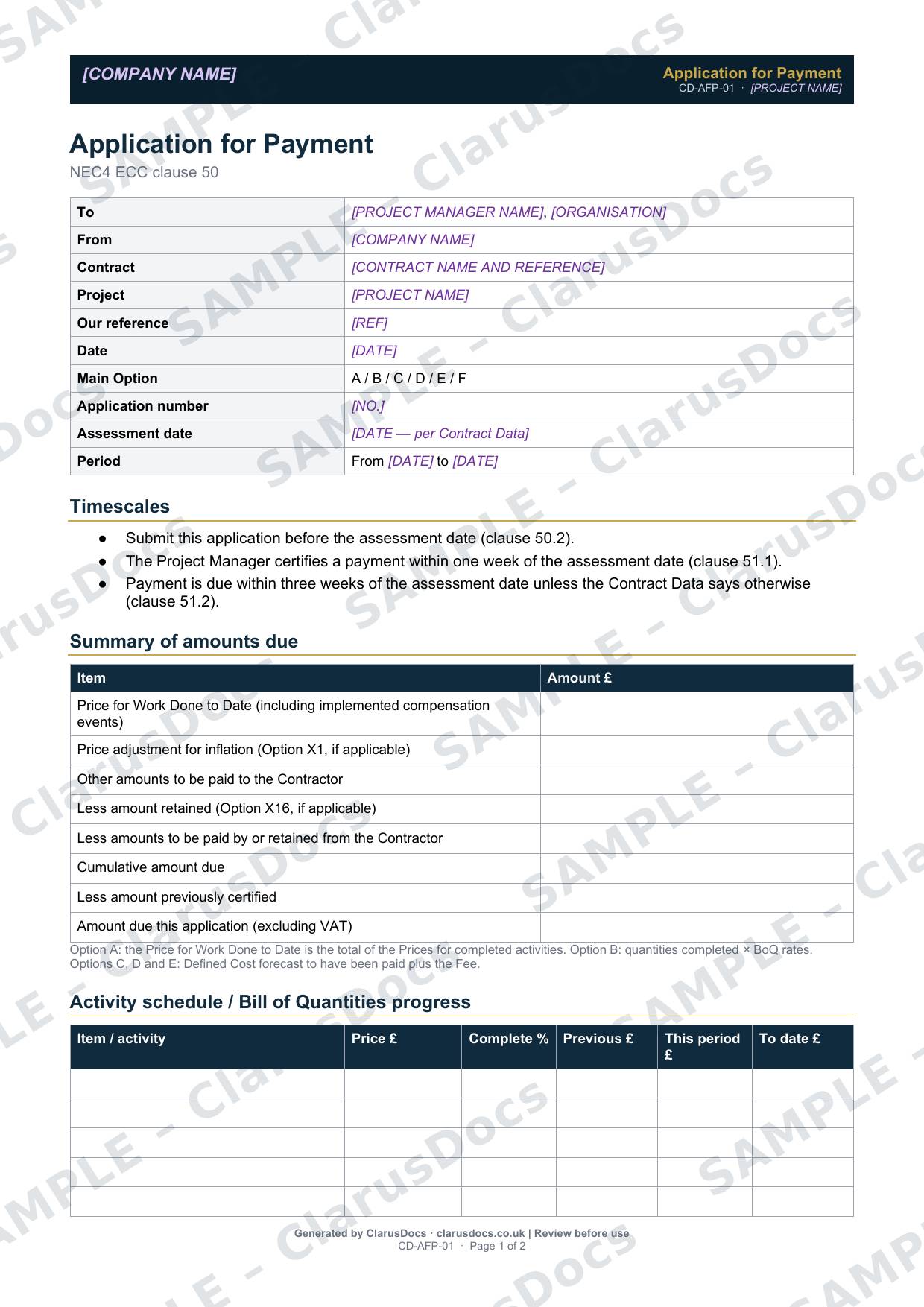
This NEC4 application for payment template sets out what you are owed before each assessment date: the Price for Work Done to Date, implemented compensation events, retention and the amount previously certified. It works for Main Options A to E.
 See what you get →
Completed except the facts only you know
£29 + VAT
£34.80 inc. VAT
- Fills in: Header details and the items to check for your project.
- Stays [TO CONFIRM]: References, names and locations you haven’t given us. Results, readings, dates and signatures are left blank.
- A competent person must review before use.
- Company logo in header
- Delivered in minutes
- Word document (.docx)
Template
£12 + VAT
£14.40 inc. VAT
Blank form — fill in yourself
- Word document (.docx)
- Guidance notes included
- Instant download
- Use on any project
Prices exclude VAT: UK customers pay 20% VAT; VAT is not charged for customers outside the UK.All documents are drafts. Placeholders marked [TO CONFIRM] must be completed with your site-specific details. A competent person must review before use on site.
What it's for
Under NEC4, the Project Manager assesses the amount due at each assessment date. A clear application, submitted before that date, makes sure nothing is missed and gives a clear record if the certified amount is lower than expected.
When you need it
Before every assessment date in the Contract Data (clause 50.2). The Project Manager certifies within one week of the assessment date (clause 51.1). Payment is due within three weeks of the assessment date, unless the Contract Data says otherwise (clause 51.2).
Who signs it
The contractor’s project manager or quantity surveyor.
What's inside
- Contract, Main Option, application number, assessment date and period
- The payment timescales
- A summary of amounts due, from the Price for Work Done to Date through to the amount due this period
- A note on how the Price for Work Done to Date is worked out for Options A, B and C to E
- An activity schedule or bill of quantities progress table
- A compensation event summary with status and amounts
- Retention under Option X16
- A checklist of supporting documents
FAQ
- Does it handle retention?
- Yes. There is a section for Option X16, covering the retention free amount, the percentage, the amount retained to date and the release arrangements.
- Can I use it for a cost-reimbursable contract?
- Yes. For Options C, D and E, the Price for Work Done to Date is based on Defined Cost plus the Fee. Attach your Defined Cost records.
- What if the certified amount is lower than my application?
- Keep the application and its supporting documents. They show what you asked for and why, which you will need if you challenge the assessment.
- What is [TO CONFIRM]?
- Details only you know, such as references, names and locations. We never guess these. They appear as highlighted [TO CONFIRM] placeholders, and the form opens with a list of every one. Results, readings, dates and signatures are left blank for completion at the time.
- Can I edit the document?
- Yes. Both options are Word documents you can edit freely.
- Do I still need to review it?
- Yes. A competent person must check every document against the actual site and works before it is used. ClarusDocs gives you a complete first draft, not a substitute for that check.
Related documents
- Compensation Event Quotation — Cover SheetSubmit every CE quotation complete, on time and in the right form
- CE Notification LetterThe letter that tells the Project Manager about a compensation event — within 8 weeks
- Early Warning NoticeThe notice that flags a problem early, before it costs time or money
- Site Instruction LogLog every instruction now — so you can claim it later
- Defects RegisterTrack every notified Defect to correction — and protect your final account
- Completion and Take Over Request LetterAsk for Completion to be certified — and set up take over properly