Variation Order Template and Variation Log
Written from experience on CTRL, Crossrail and Network Rail
This variation order template records one change to the work: who instructed it and how, what changed and why, the effect on price and time, and the agreement. The variation log in Excel keeps every change on the job in one list, with status, quoted and agreed amounts, and totals. The wording is contract-neutral, for NEC4, JCT or a bespoke subcontract.
 See what you get →
Template
£12 + VAT
£14.40 inc. VAT
Blank form — fill in yourself
- Zip file: Word form (.docx) and Excel log (.xlsx)
- Guidance notes included
- Instant download
- Use on any project
Prices exclude VAT: UK customers pay 20% VAT; VAT is not charged for customers outside the UK.All documents are drafts. Complete the placeholders with your own details, and have a competent person review them before use.
What it's for
Changes are where contractors lose money: work done on a verbal instruction, a change never priced, or a quotation sent after the contract’s time limit. One form per change and one log for the job gives you the record you need to be paid for the change and to show what was agreed.
When you need it
As soon as a change comes up: an instruction, a revised drawing, a request by email, or a site condition that differs from what was priced. Raise it the same day and follow your contract’s procedure.
Who signs it
You sign the form when you submit it. The person who can agree changes under your contract signs to agree it.
What's inside
- Variation order (Word): reference, project and contract
- The instruction: who gave it, how, when, and the contract clause and time limit
- The change, the reason and the evidence attached
- Effect on price: labour, plant, materials, subcontract, overheads and profit, omissions
- Effect on time and on the completion date
- Status, agreed price and time, and signatures
- Variation log (Excel): status list, quoted and agreed totals, time effect
- A filled-in example log and how-to notes
FAQ
- Does it work with NEC4 and JCT?
- Yes. The wording is contract-neutral and asks for your contract’s own clause and time limits. Under NEC4, for example, a change to the Scope is a compensation event; under JCT contracts a change is usually a Variation. Use your contract’s procedure.
- What if the instruction was verbal?
- Record it on the form straight away, ask for written confirmation and note the date you asked. Unless the change is needed urgently for safety, wait for written confirmation before starting.
- Why keep a log as well as the forms?
- The log shows every change on the job at a glance: what has been notified, quoted and agreed, and what is still outstanding. Review it at every progress meeting.
- How do I show an omission?
- Enter it as a negative amount in the price section and in the log.
- What are the [PLACEHOLDERS]?
- Purple text in square brackets, such as [COMPANY NAME], marks the details you fill in. Replace each one with your own details, and remove anything that doesn’t apply, before the document is used.
- Can I edit the document?
- Yes. The form is a Word document and the log an Excel spreadsheet, both editable.
- Do I still need to review it?
- Yes. A competent person must check every document against the actual site and works before it is used. ClarusDocs gives you a complete first draft, not a substitute for that check.
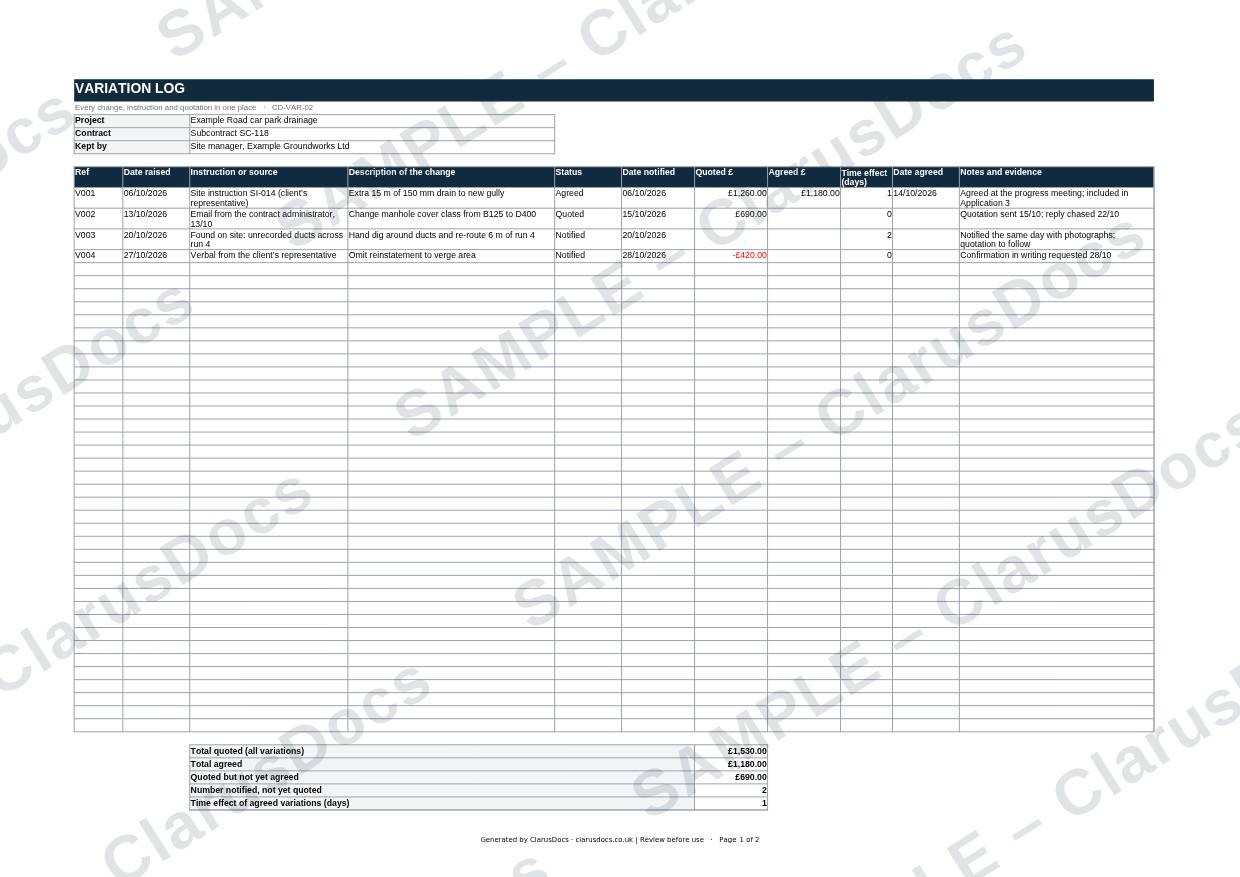
Example: a variation log
Four changes on a drainage subcontract, part-way through the job.
Example only: illustrative content, not from a real project.
| Ref | Change | Status | Quoted | Agreed | Days |
|---|---|---|---|---|---|
| V001 | Extra 15 m of 150 mm drain to a new gully (site instruction SI-014) | Agreed | £1,260 | £1,180 | 1 |
| V002 | Manhole cover class changed from B125 to D400 (email) | Quoted | £690 | 0 | |
| V003 | Unrecorded ducts found across run 4: hand dig and re-route 6 m | Notified | 2 | ||
| V004 | Reinstatement to verge omitted (verbal, confirmation requested) | Notified | −£420 | 0 |
How to deal with a change
- Give the change the next reference in the log the day it comes up.
- Fill in the form: who instructed it, how and when, and the clause and time limit in your contract.
- Describe what changed and why, and attach the evidence: instruction, drawings, photographs.
- Price it and work out the effect on time.
- Submit it within the contract’s time limit and update the log’s status.
- Record the agreed price and time when it is agreed, and include it in your next application or invoice.
Related documents
- CIS Invoice TemplateCIS, retention and VAT worked out, with a reverse charge switch
- Construction Quote TemplateA clear price with the exclusions and assumptions in writing
- Compensation Event Quotation — Cover SheetSubmit every CE quotation complete, on time and in the right form
- Application for PaymentA clear application before every assessment date — so nothing is missed
- CE Notification LetterThe letter that tells the Project Manager about a compensation event — within 8 weeks
- Early Warning NoticeThe notice that flags a problem early, before it costs time or money