CIS Invoice Template
Written from experience on CTRL, Crossrail and Network Rail
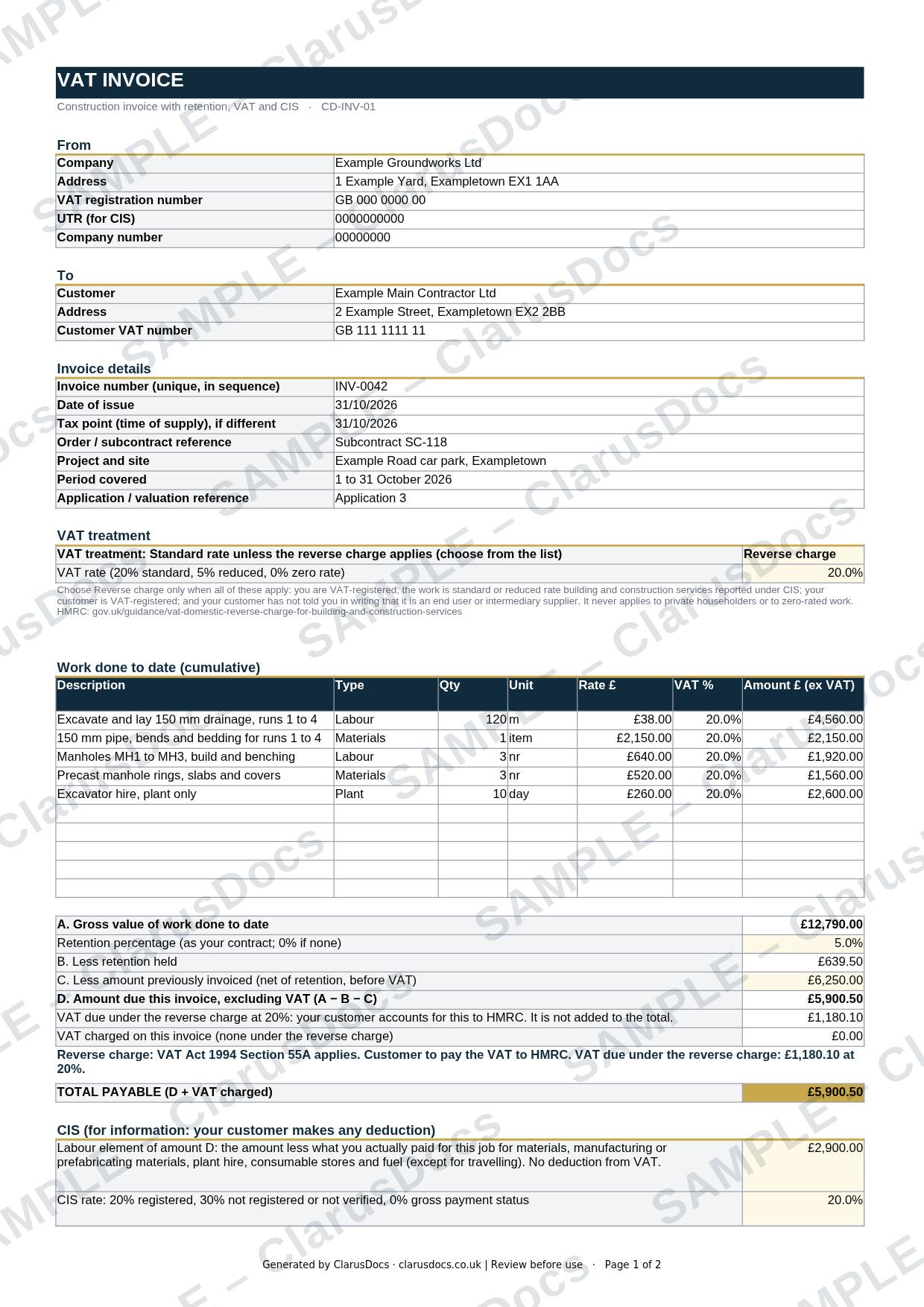
This CIS invoice template is an Excel workbook for UK subcontractors and contractors invoicing under the Construction Industry Scheme. It works out the value of work to date, the retention held, the amount due this time and the VAT. It starts at the standard rate, with a clear switch to the VAT domestic reverse charge that prints HMRC’s wording and shows the VAT due without charging it. It also shows the CIS deduction to expect.
 See what you get →
Template
£9 + VAT
£10.80 inc. VAT
Blank form — fill in yourself
- Excel spreadsheet (.xlsx)
- Guidance notes included
- Instant download
- Use on any project
Prices exclude VAT: UK customers pay 20% VAT; VAT is not charged for customers outside the UK.All documents are drafts. Complete the placeholders with your own details, and have a competent person review them before use.
What it's for
A CIS invoice goes wrong in the same places: retention left off, the amount previously invoiced miscounted, VAT charged when the reverse charge applies, or the payment short because nobody allowed for CIS. This workbook sets out each step in order, so the customer can follow how you reached the figure and you can see what should arrive in the bank.
When you need it
Every time you bill for work: monthly or at each valuation on a running job, or once at the end of a small one. Use a new invoice number each time.
Who signs it
No signature is needed. Send it to the person named in your order or subcontract, with any valuation or application it relates to.
What's inside
- Your details, VAT registration number and UTR, and the customer’s details and VAT number
- Invoice number, date, tax point, order reference, project and period
- Work done to date, line by line, marked as labour, materials, plant or other
- Retention held, amount previously invoiced and the amount due this time
- VAT treatment: standard rate by default, with a switch to reverse charge, reduced or zero rate, and a note on when the reverse charge applies
- A VAT rate against each line, as HMRC’s VAT invoice rules ask
- Under the reverse charge: HMRC’s wording, and the VAT due shown but not charged
- The expected CIS deduction at 0%, 20% or 30%, and the payment to expect
- A filled-in example sheet and a how-to sheet
FAQ
- What is a CIS invoice?
- An invoice from a subcontractor to a contractor for construction work under the Construction Industry Scheme. It is an ordinary invoice, and a VAT invoice if you are VAT-registered. The contractor takes the CIS deduction from the labour when it pays you, not from VAT or the costs you paid for that job, such as materials and plant hire, and gives you a statement. Showing labour and materials separately helps the contractor work out the deduction; it can ask you for evidence of what you paid for materials.
- When does the VAT domestic reverse charge apply?
- Since 1 March 2021 it applies when a VAT-registered business supplies standard or reduced rate building and construction services, reported under CIS, to a VAT-registered customer, typically a subcontractor invoicing a contractor. It does not apply when the customer is an end user or intermediary supplier and has told you so in writing, to private householders, or to zero-rated work. Otherwise normal VAT rules apply, which is why the invoice starts at the standard rate. Check HMRC’s guidance for your supply.
- What does a reverse charge invoice need to show?
- HMRC’s reverse charge technical guide says the invoice must show everything a normal VAT invoice shows, make clear that the reverse charge applies and that the customer accounts for the VAT, and state how much VAT is due under the reverse charge (or the VAT rate, if the amount cannot be shown), without including that VAT in the amount charged. The template shows the amount and prints HMRC’s example wording: “VAT Act 1994 Section 55A applies. Customer to pay the VAT to HMRC.”
- Does the invoice take off CIS?
- No. Your customer makes the CIS deduction and gives you a statement. The template shows what to expect: 20% if you are registered and verified, 30% if not, and nothing with gross payment status. The deduction is worked out on your invoice less VAT and less what you actually paid for that job for materials, manufacturing or prefabricating materials, plant hire, consumable stores and fuel (except for travelling), as GOV.UK’s “CIS: make deductions and pay subcontractors” page sets out.
- How is retention worked out?
- As a percentage of the gross value of work to date, at the rate in your contract. The template shows the amount held, so you can track it and invoice for its release when the contract says it is due.
- Does it work in Google Sheets or Numbers?
- It is an ordinary Excel file with standard formulas, so it should open in Google Sheets, LibreOffice and Numbers. Check the totals the first time you use it in another program.
- What are the [PLACEHOLDERS]?
- Purple text in square brackets, such as [COMPANY NAME], marks the details you fill in. Replace each one with your own details, and remove anything that doesn’t apply, before the document is used.
- Can I edit the document?
- Yes. It’s an Excel spreadsheet you can edit freely; the formulas are not locked.
- Do I still need to review it?
- Yes. A competent person must check every document against the actual site and works before it is used. ClarusDocs gives you a complete first draft, not a substitute for that check.
Example: a monthly subcontract invoice
A groundworks subcontractor’s third monthly invoice to a VAT-registered main contractor that reports it under CIS, so the VAT treatment has been switched from standard rate to reverse charge. 5% retention.
Example only: illustrative content, not from a real project.
| Line | Amount |
|---|---|
| A. Gross value of work done to date | £12,790.00 |
| B. Less retention held (5%) | £639.50 |
| C. Less previously invoiced | £6,250.00 |
| D. Amount due this invoice before VAT | £5,900.50 |
| VAT charged (reverse charge: VAT due £1,180.10, paid by the customer to HMRC) | £0.00 |
| Total payable | £5,900.50 |
| Expected CIS deduction (20% of £2,900 labour) | £580.00 |
| Expected payment | £5,320.50 |
How to fill in the invoice
- Fill in your details and the customer’s, and give the invoice a new number.
- List all the work done to date, not just this month, and mark each line as labour, materials, plant or other.
- Enter the retention percentage from your contract and the total you have already invoiced, before VAT.
- Check the VAT treatment. It starts at the standard rate; switch it to reverse charge only if you and your customer are VAT-registered, the work is reported under CIS, and the customer has not told you in writing that it is an end user. The sheet then shows the VAT due and HMRC’s wording, and adds no VAT to the total.
- Enter the labour element and your CIS rate to see the payment to expect.
- Check the figures, save it as a PDF and send it with the valuation it relates to.
Sources
- HMRC: VAT domestic reverse charge for building and construction services
- HMRC: VAT reverse charge technical guide (invoices and other VAT documents)
- HMRC: Record keeping for VAT (VAT Notice 700/21), details to include on a VAT invoice
- GOV.UK: CIS: make deductions and pay subcontractors
- GOV.UK: What you must do as a CIS subcontractor: getting paid
Related documents
- Construction Quote TemplateA clear price with the exclusions and assumptions in writing
- Variation Order and Variation LogEvery change instructed, priced and agreed in writing
- Service Search and CAT Scan RecordProof that services were searched for and scanned before digging
- Ecology Clearance RecordRecord that protected species were checked before clearing the site
- Pre-Commencement Meeting Minutes TemplateAgenda and minutes for the meeting that kicks the job off properly
- Health and Safety File — Index and Cover SheetThe front sheet and contents list for the file the client keeps after handover