DSE Assessment Template
Written from experience on CTRL, Crossrail and Network Rail
This DSE assessment template checks that a computer workstation, in the site office or at home, is set up properly for the person using it, under the Health and Safety (Display Screen Equipment) Regulations 1992.
 See what you get →
Completed except the facts only you know
£18 + VAT
£21.60 inc. VAT
- Fills in: Hazards, controls and risk scores before and after controls, for your task.
- Stays [TO CONFIRM]: Site address and postcode, nearest A&E, named people and contacts.
- A competent person must review before use.
- Company logo in header
- Delivered in minutes
- Word document (.docx)
Template
£6 + VAT
£7.20 inc. VAT
Blank assessment — fill in yourself
- Word document (.docx)
- Guidance notes included
- Instant download
- Use on any project
Prices exclude VAT: UK customers pay 20% VAT; VAT is not charged for customers outside the UK.All documents are drafts. Placeholders marked [TO CONFIRM] must be completed with your site-specific details. A competent person must review before use on site.
What it's for
Poorly set up screens, chairs and laptops lead to neck, back and upper limb problems, eye strain and fatigue. The regulations require employers to assess the workstations of people who use display screen equipment regularly as part of their work, and to reduce the risks found. The checklist makes the assessment quick and consistent.
When you need it
When someone becomes a regular screen user, when they move to a new workstation or start working from home, and when the equipment changes or they report discomfort.
Who signs it
The assessor and the user.
What's inside
- User details and workstation location
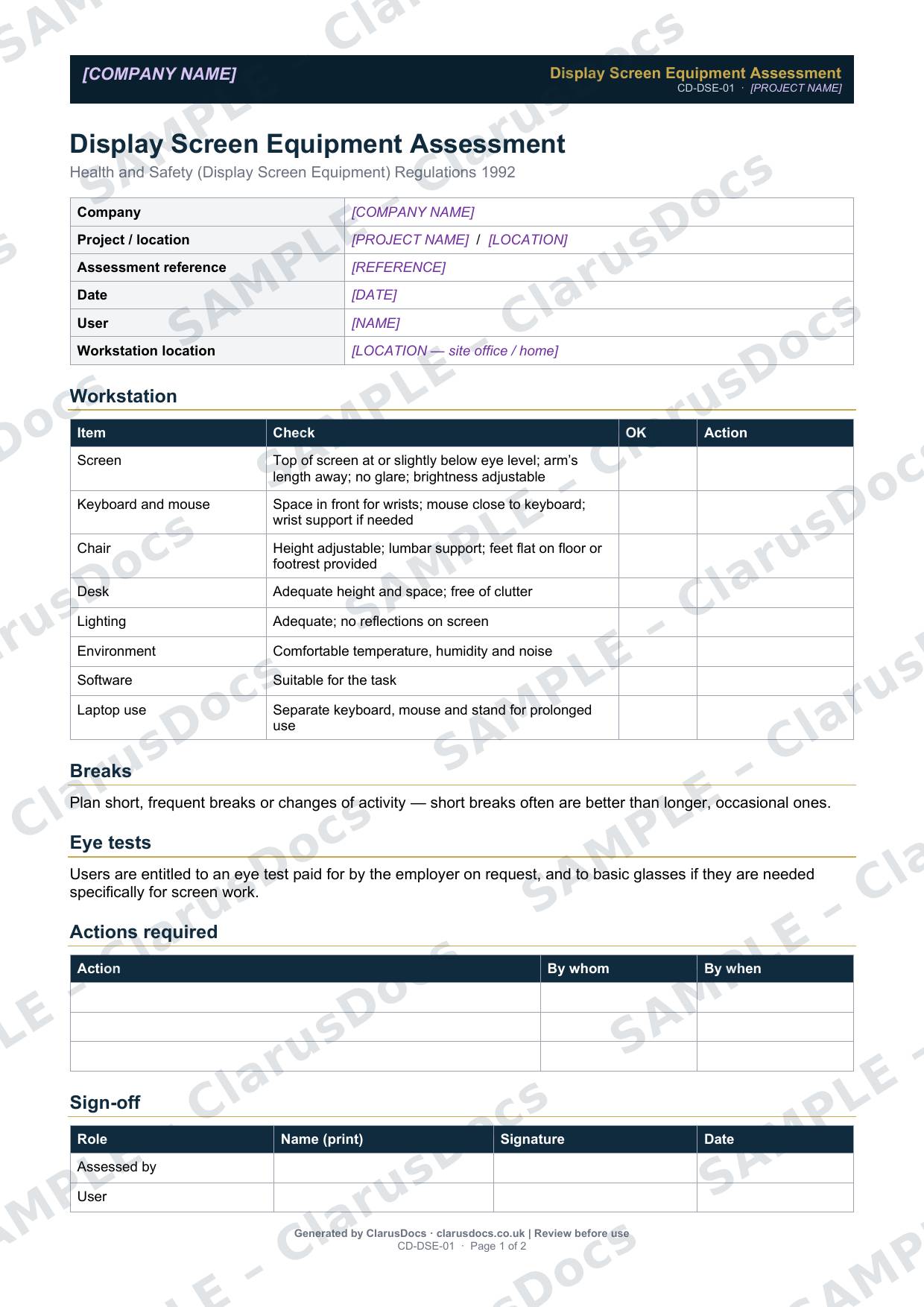
- An eight-point checklist covering screen, keyboard and mouse, chair, desk, lighting, environment, software and laptop use
- Guidance on breaks
- The user’s entitlement to eye tests and basic glasses for screen work
- An actions table, and sign-off by the assessor and the user
FAQ
- Who counts as a DSE user?
- Someone who uses a screen regularly as a significant part of their normal work, typically for continuous periods of an hour or more each day.
- Does it apply to home working?
- Yes. The template records whether the workstation is in a site office or at home.
- Do we have to pay for glasses?
- Users are entitled to an eye test paid for by the employer on request. If they need glasses specifically for screen work, the employer pays for a basic pair.
- What should happen after the assessment?
- Complete the actions table with who will fix each problem and by when, then check the changes have been made and the user is comfortable.
- What is [TO CONFIRM]?
- Details only you know, such as your site address and postcode, the nearest A&E, named people and contact numbers. We never guess these. They appear as highlighted [TO CONFIRM] placeholders, and the document opens with a list of every one, so you can fill them in before the assessment is signed and used.
- Can I edit the document?
- Yes. Both options are Word documents you can edit freely.
- Do I still need to review it?
- Yes. A competent person must check every document against the actual site and works before it is used. ClarusDocs gives you a complete first draft, not a substitute for that check.
Related documents
- Lone Working Risk AssessmentPlan how someone working alone stays safe and in contact
- New and Expectant Mothers Risk AssessmentThe assessment needed once a worker tells you she is pregnant or a new mother
- Drug and Alcohol PolicyA clear, fair drug and alcohol policy with testing and support
- COSHH Assessment TemplateAssess a hazardous substance before anyone uses it
- Manual Handling AssessmentAssess lifting and carrying tasks — task, load, environment, individual
- Noise and Vibration AssessmentWork out noise and vibration exposure from tools and plant, and what to do about it