Inspection and Test Plan (ITP) Template
Written from experience on CTRL, Crossrail and Network Rail
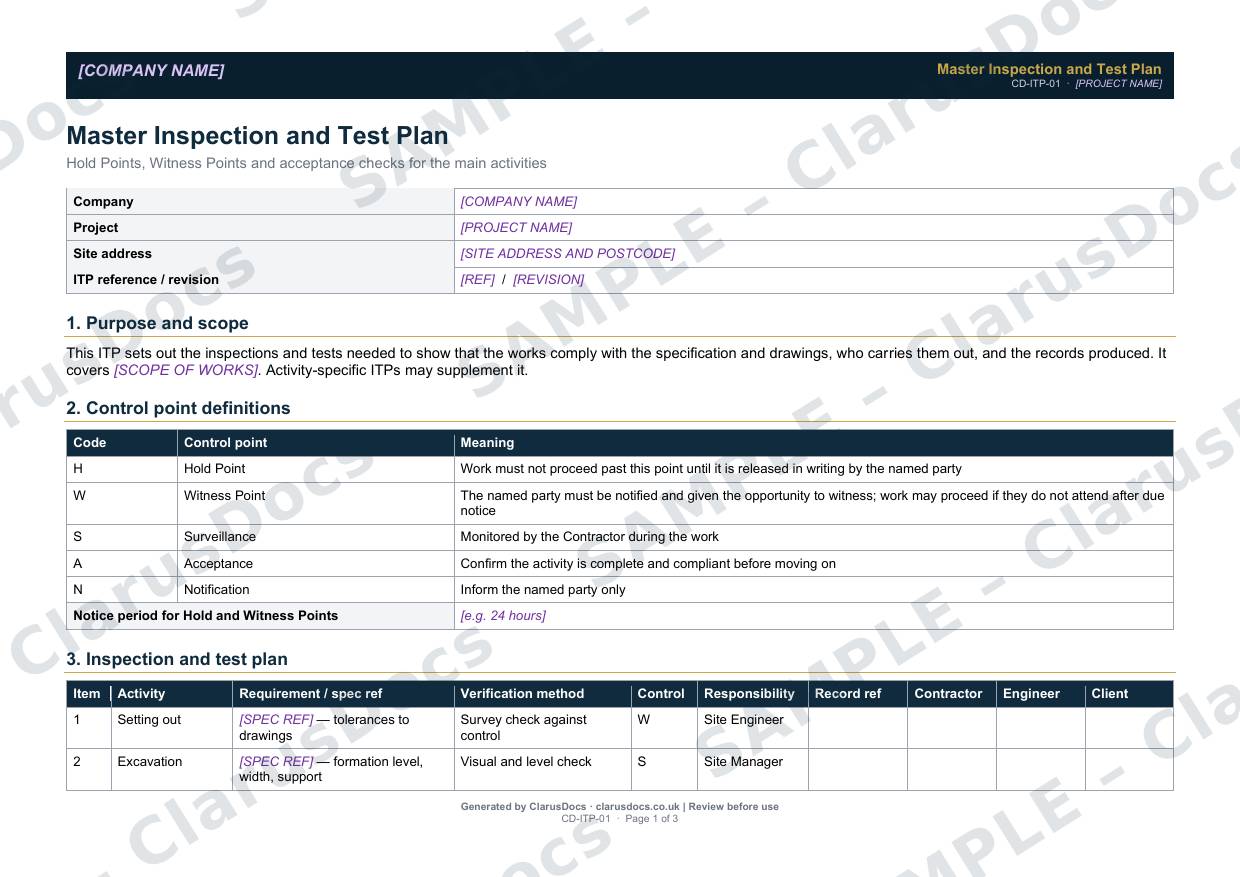
This inspection and test plan template sets out, before work starts, every inspection and test needed to show the works meet the specification: who carries each one out, the type of control point, and the record produced. It comes pre-filled with eleven common civil engineering activities.
 See what you get →
Completed except the facts only you know
£59 + VAT
£70.80 inc. VAT
- Fills in: Header details and the items to check for your project.
- Stays [TO CONFIRM]: References, names and locations you haven’t given us. Results, readings, dates and signatures are left blank.
- A competent person must review before use.
- Company logo in header
- Delivered in minutes
- Word document (.docx)
Template
£25 + VAT
£30 inc. VAT
Blank inspection record — fill in yourself
- Word document (.docx)
- Guidance notes included
- Instant download
- Use on any project
Prices exclude VAT: UK customers pay 20% VAT; VAT is not charged for customers outside the UK.All documents are drafts. Placeholders marked [TO CONFIRM] must be completed with your site-specific details. A competent person must review before use on site.
Why it matters
When the dispute arrives, the question is always: what did you have in place and when? This document is the answer.
What it's for
Quality problems in groundworks are usually found too late, after the trench is backfilled or the concrete is poured. An ITP agrees the checks in advance, including the Hold Points where work must stop until someone signs it off. It gives the site team and the client the same list of what will be checked, when and by whom.
When you need it
Before work starts on site, issued to the client or Supervisor for agreement. Revise it when the scope or specification changes, and use it to check that every Hold Point has been released before Completion.
Who signs it
The contractor’s project manager and the client’s engineer or Supervisor sign the plan. Each activity row has separate sign-off columns for the contractor, the engineer and the client.
What's inside
- Purpose and scope
- Control point definitions: Hold, Witness, Surveillance, Acceptance and Notification
- The notice period for Hold and Witness Points
- A landscape ITP table for eleven activities, from setting out and service location to drainage testing, CCTV, manholes, concrete and surface reinstatement
- Requirement, verification method, responsibility and record reference for each activity
- Document control and approval signatures
FAQ
- What is the difference between a Hold Point and a Witness Point?
- At a Hold Point, work must not proceed until the named party releases it in writing. At a Witness Point, the named party is given notice and the chance to attend, and work can go ahead if they do not come.
- Can I add activities?
- Yes. The eleven rows are a starting point. Add rows for your own activities, or use separate activity ITPs alongside the master.
- Who is the "engineer" under NEC4?
- The Supervisor carries out tests and inspections. The Project Manager gives instructions and acceptances.
- What is [TO CONFIRM]?
- Details only you know, such as references, names and locations. We never guess these. They appear as highlighted [TO CONFIRM] placeholders, and the inspection record opens with a list of every one. Results, readings, dates and signatures are left blank for completion at the time.
- Can I edit the document?
- Yes. Both options are Word documents you can edit freely.
- Do I still need to review it?
- Yes. A competent person must check every document against the actual site and works before it is used. ClarusDocs gives you a complete first draft, not a substitute for that check.
Related documents
- Drainage Pressure Test RecordThe air or water test record that proves new drains don’t leak
- CCTV Drainage Survey RecordProve the drains are right before you reinstate over them
- Concrete Cube Test RegisterEvery cube, every result — checked against BS EN 206
- Snagging ListEvery snag at completion — prioritised, owned and closed
- Pre-Backfill Inspection ChecklistThe check that pipes, bedding and surround are right before the trench is filled
- Pile Record SheetOne sheet per pile — installation, concrete, cage and integrity test