Cold Weather Working Plan
Written from experience on CTRL, Crossrail and Network Rail
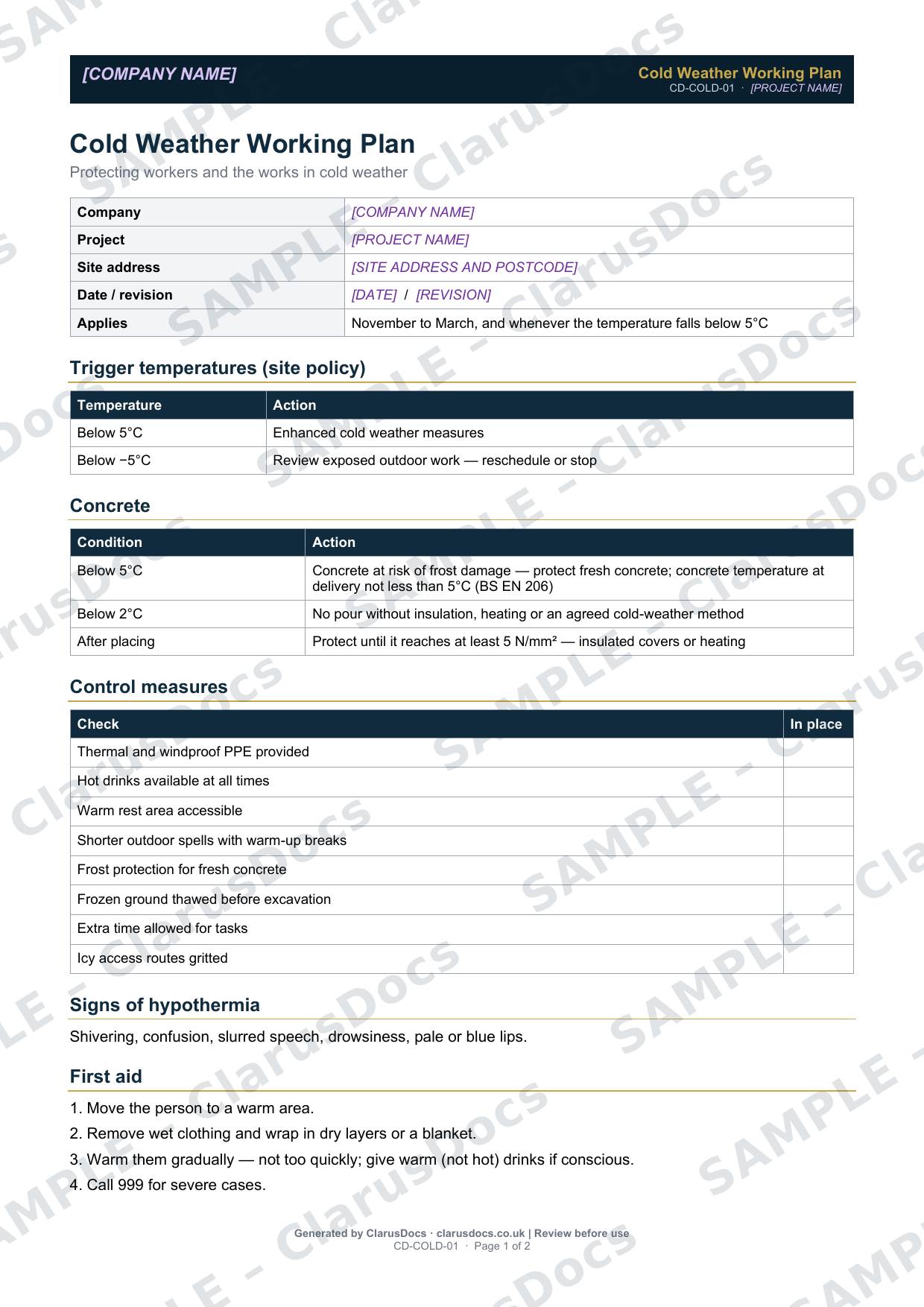
This cold weather working plan sets out what the site does when it gets cold, to protect people, fresh concrete and the works: trigger temperatures, concrete pour restrictions, control measures, the signs of hypothermia, and first aid.
 See what you get →
Completed except the facts only you know
£25 + VAT
£30 inc. VAT
- Fills in: The plan and its arrangements for your project.
- Stays [TO CONFIRM]: Site address and postcode, nearest A&E, named people and contacts.
- A competent person must review before use.
- Company logo in header
- Delivered in minutes
- Word document (.docx)
Template
£9 + VAT
£10.80 inc. VAT
Blank plan — fill in yourself
- Word document (.docx)
- Guidance notes included
- Instant download
- Use on any project
Prices exclude VAT: UK customers pay 20% VAT; VAT is not charged for customers outside the UK.All documents are drafts. Placeholders marked [TO CONFIRM] must be completed with your site-specific details. A competent person must review before use on site.
What it's for
Cold weather brings slips on ice, numb hands, slower reactions and, in serious cases, hypothermia. It also affects the works, through frost damage to fresh concrete and frozen ground. A plan agreed before winter means the controls are ready when the temperature drops, rather than improvised on the day.
When you need it
From November to March, and whenever the temperature falls below 5°C. Review it before each winter.
Who signs it
The site manager.
What's inside
- When it applies, and trigger temperatures set as site policy
- Concrete restrictions: protecting fresh concrete, conditions where no pour should go ahead without an agreed cold-weather method, and protection after placing
- An eight-point control checklist, including thermal PPE, hot drinks, a warm rest area, warm-up breaks, frost protection, thawing frozen ground, extra time and gritting
- The signs of hypothermia
- Four first aid steps
- Sign-off
FAQ
- Is there a legal minimum temperature for outdoor work?
- No. Employers must assess and control the risks of working in the cold, and CDM 2015 requires protection from adverse weather for outdoor places of work, where necessary for health or safety, so far as is reasonably practicable (regulation 34). The trigger temperatures in the plan are site policy, which you can adjust.
- Why does the plan cover concrete?
- Fresh concrete can be damaged by frost. The plan sets out when to protect it and when not to pour without an agreed method.
- What are the signs of hypothermia?
- Shivering, confusion, slurred speech, drowsiness, and pale or blue lips. Call 999 for severe cases.
- Can the trigger temperatures be changed?
- Yes. They are site policy. Set them to suit your work, your workforce and your client’s requirements, and brief any changes to the site team.
- What is [TO CONFIRM]?
- Details only you know, such as your site address and postcode, the nearest A&E, named people and contact numbers. We never guess these. They appear as highlighted [TO CONFIRM] placeholders, and the document opens with a list of every one, so you can fill them in before the plan is signed and used.
- Can I edit the document?
- Yes. Both options are Word documents you can edit freely.
- Do I still need to review it?
- Yes. A competent person must check every document against the actual site and works before it is used. ClarusDocs gives you a complete first draft, not a substitute for that check.
Related documents
- Site Wellbeing PlanShow how the site looks after people’s physical and mental health
- Heat Stress Management PlanWhat the site does when it gets hot — triggers, controls and first aid
- Fatigue Management PlanLimits on hours and how the site spots and deals with tiredness
- Lone Working Risk AssessmentPlan how someone working alone stays safe and in contact
- New and Expectant Mothers Risk AssessmentThe assessment needed once a worker tells you she is pregnant or a new mother
- Display Screen Equipment (DSE) AssessmentCheck a computer workstation is set up properly for the person using it