Corrective Action Register Template
Written from experience on CTRL, Crossrail and Network Rail
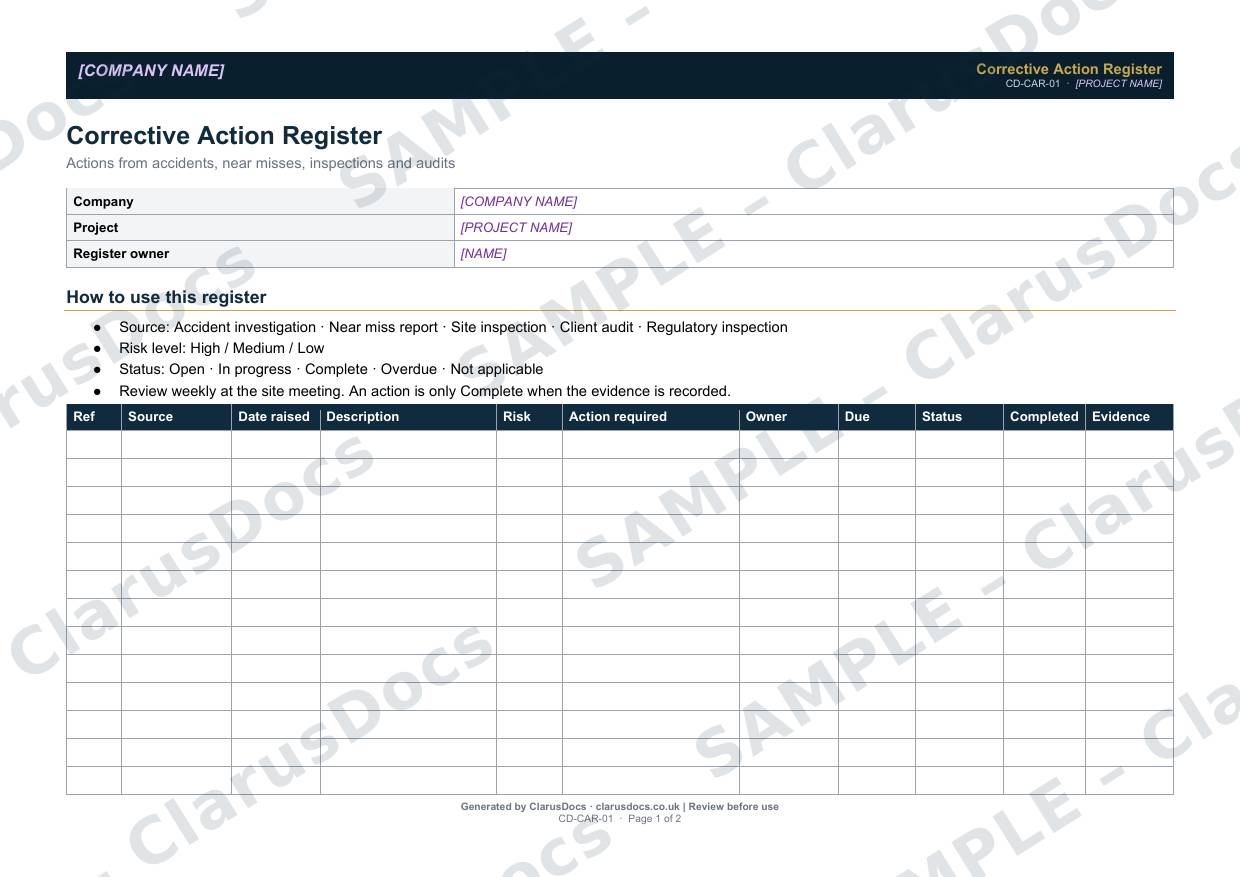
This corrective action register tracks every action that comes out of accident investigations, near miss reports, site inspections and audits, with an owner, a due date, a status and evidence that it was completed, until it is closed.
 See what you get →
Completed except the facts only you know
£25 + VAT
£30 inc. VAT
- Fills in: The register header for your project.
- Stays [TO CONFIRM]: Names and references you haven’t given us. Entry rows are left blank.
- A competent person must review before use.
- Company logo in header
- Delivered in minutes
- Word document (.docx)
Template
£9 + VAT
£10.80 inc. VAT
Blank register — fill in yourself
- Word document (.docx)
- Guidance notes included
- Instant download
- Use on any project
Prices exclude VAT: UK customers pay 20% VAT; VAT is not charged for customers outside the UK.All documents are drafts. Placeholders marked [TO CONFIRM] must be completed with your site-specific details. A competent person must review before use on site.
What it's for
Actions agreed after an incident or audit are easily forgotten once the urgency passes. A single register shows what is open, what is overdue and who owns it. An action only counts as complete when the evidence is recorded, and that is often the first thing a client auditor or inspector asks to see.
When you need it
From the start of the project, with each new action added as it is raised, whatever its source. Review it weekly at the site meeting.
Who signs it
The project manager signs each weekly review in the review record.
What's inside
- Company, project and register owner
- How to use it: sources, risk levels and status definitions
- A landscape register with reference, source, date raised, description, risk, action required, owner, due date, status, completion date and evidence
- A review record with the numbers open and overdue at each review
FAQ
- What sources feed into it?
- Accident investigations, near miss reports, site inspections, client audits and regulatory inspections.
- When is an action complete?
- Only when the evidence that it has been done is recorded, such as a photo, an updated RAMS or a training record.
- How often should it be reviewed?
- The template sets a weekly review at the site meeting, with the project manager signing off each review.
- What happens to overdue actions?
- They are marked overdue in the status column and counted in the weekly review record, so the project manager can follow them up with the owner and agree a new date or escalate.
- What is [TO CONFIRM]?
- Details only you know, such as names, references and dates. We never guess these. They appear as highlighted [TO CONFIRM] placeholders, and the register opens with a list of every one. The entry rows are always left blank: we never invent entries, so you record them as the work goes on.
- Can I edit the document?
- Yes. Both options are Word documents you can edit freely.
- Do I still need to review it?
- Yes. A competent person must check every document against the actual site and works before it is used. ClarusDocs gives you a complete first draft, not a substitute for that check.
Related documents
- Asbestos Management RecordKeep asbestos findings and removal actions in one record before work starts
- Stakeholder Notification LogShow who was told about the works, when and how
- CDM Duty Holders RegisterEveryone with a CDM duty on the project, and how to reach them
- Site Instruction LogLog every instruction now — so you can claim it later
- Drawing RegisterProve which revision you were building to, on any date
- Permit to DigSign-off that buried services are found and marked before anyone breaks ground